


Manual Order Processing in B2B: Common Problems and Ways to Automate It
-
Last Updated:

02 Jul 2026
-
Read Time:

6 Min Read
-
Written By:
 Elia Martell
-
873
Table of Contents
Explore the biggest challenges of manual B2B order processing and learn how automation, ERP integration, and customer portals improve accuracy, speed, and customer experience.
Most B2B companies didn't choose manual order processing — they simply never stopped using it. Orders kept coming in by email, phone, and PDF attachments, and someone on the team kept typing them into a spreadsheet or an ERP one line at a time. It worked when volumes were low. The trouble starts when a business grows and the same manual habits become one of the things holding it back.
That's usually the point when companies start looking at custom B2B portal development as a way to take order intake out of inboxes and put it into a system built for the job. Before getting into what automation fixes, it's worth laying out where manual processing breaks down — the symptoms often look unrelated until they are traced back to the same root cause.
Common Problems Caused by Manual Order Processing
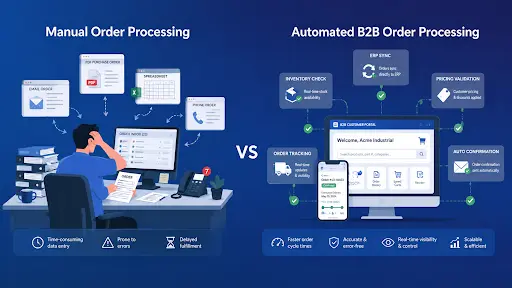
When orders move through email, phone calls, and spreadsheets instead of a structured system, a predictable set of problems shows up regardless of industry. Re-keying data from a PDF or email into an ERP carries an obvious risk: every transcription is a chance for a typo, a misread quantity, or a missed line item. Even a low error rate may not look dramatic on one order, but it compounds quickly across thousands of orders a month.
A few other problems recur regardless of company size:
- Orders sitting in a queue because the person who normally processes them is out sick or on vacation
- Pricing or contract terms applied incorrectly because a rep didn't have the latest spreadsheet
- Customers calling in just to ask "did you get my order?" with no automatic confirmation in place
- Warehouse staff picking the wrong SKU because the order was handwritten or poorly formatted
None of these issues look catastrophic alone. Together, they create a slow, error-prone operation dependent on a handful of people who know the workarounds.
Pricing, Stock, and Product Data Errors
Pricing mistakes are some of the costliest manual errors, mainly because they often go unnoticed until an invoice doesn't match the contract. A rep working from an outdated spreadsheet might apply last quarter's discount tier or misread a customer-specific rate. Multiply that across dozens of accounts with their own negotiated terms, and billing inconsistencies accumulate quickly.
Stock errors follow a similar pattern. There's often a delay between when an order arrives and when it's entered into the system, during which inventory numbers may no longer reflect reality. If a popular item sells out in that window, the business may confirm stock it cannot actually fulfill, leading to backorders and a customer who starts shopping around. Product data adds a third layer of risk: outdated descriptions or mismatched SKUs across the catalog and ERP create friction right when a buyer is trying to order.
Slow Order Approval and Confirmation
In a manual workflow, an order often passes through several people before confirmation — someone checks pricing, someone checks credit terms, someone checks stock. Each handoff adds delay, and if any one person is out of office, the chain stalls.
This matters more than it might seem. Buyers who don't get a fast confirmation may place a backup order with a competing supplier as insurance. If both end up shipping, the original company handles a return and a strained relationship at once. Workflows involving discounts above a certain threshold often move even slower, since they usually require a manager to sign off before anything moves forward.
Lack of Visibility for Customers and Sales Teams
One quiet cost of manual processing is that nobody has the full picture of where an order stands. The rep who took it knows it was placed. The warehouse knows what's been picked. Finance knows what's been invoiced. That information typically lives in separate places — a notebook, a shared drive, someone's inbox — and rarely gets consolidated.
For the customer, this becomes a familiar loop: they call to ask about their order, a rep tracks down the answer manually, and the same question repeats days later. Chasing order status across disconnected systems is exactly the kind of repetitive task that should not require a human in the loop.
How Automation Improves B2B Order Processing
Automation does not simply replicate the manual process faster — it removes the repetitive, error-prone steps. When an order arrives by email, web form, or EDI, an automated system can read the data, validate it against current pricing and stock, write it into the ERP, and send a confirmation back without anyone touching the order.
The impact can show up in measurable ways: order entry that used to take minutes drops to a fraction of that time, error rates fall, and staff who spent large portions of their week on data entry can focus on exception handling and key accounts. The savings aren't just labor — fewer errors mean fewer returns and fewer strained relationships to repair.
Key Tools for Automating B2B Orders
No single tool solves every part of order processing, but a few categories consistently show up in successful automation projects:
- Intelligent document processing (IDP) — reads purchase orders from emails, PDFs, or scans regardless of formatting and extracts structured line-item data
- ERP and CRM integration layers — keep pricing, inventory, and customer records synchronized so an order entered once is reflected everywhere
- Order validation engines — automatically check stock levels, contract pricing, and credit terms before an order moves forward
- Self-service ordering interfaces — let customers place and track orders directly, removing the need for a rep to act as a middleman
Companies that piece these tools together gradually, starting with their highest-volume order types, tend to see results faster than those attempting a single, all-at-once overhaul.
When a B2B Customer Portal Becomes the Right Solution
For companies relying on email or phone orders, point solutions like document automation solve part of the problem. But once volume, customer count, and pricing complexity reach a certain scale, a dedicated customer portal becomes the more sustainable answer. A portal gives each client a direct, self-service channel — their own pricing, catalog, and order history — instead of relying on a rep to relay that information every time.
This is also where integration matters most. A portal disconnected from the ERP just creates a new manual step elsewhere. Development teams with experience in B2B portal projects, including, tend to emphasize that a portal's real value comes from how tightly it's wired into existing systems, not the interface alone. A well-integrated portal becomes the single point where pricing, stock, and order status stay accurate, without manual re-entry that can introduce inconsistencies.
How to Start Automating Manual B2B Order Workflows
Moving away from manual processing doesn't mean replacing every system overnight. Companies that succeed tend to follow a similar, cautious sequence:
- Measure the current state — track how long order entry takes and how often errors occur, so there's a real baseline to compare against
- Identify the highest-volume, most repetitive order types — these usually offer the fastest return on automation investment
- Automate intake first — converting incoming emails or PDFs into structured data removes the most error-prone manual step
- Connect systems before adding new ones — ERP and CRM integration prevents automation from simply creating a new silo
- Expand toward self-service — once internal processing is reliable, extending order visibility and ordering capability to customers becomes the next logical step
None of these steps require rebuilding how the business operates. They shift work that software can handle reliably — reading, validating, and syncing data — away from people, so teams can focus on the parts of the relationship that benefit from a human touch.

Marketing Manager
Recent Blogs

Elia Martell
5 Virtual Recruiting Support Operations for Tech and Healthcare Teams
-
09 Oct 2026
-
8 Min
-

627


Jane Hart
Why LinkedIn Campaign Optimization Requires More Than CPC and CTR
-
09 Oct 2026
-
8 Min
-
189

Jane Hart
How to Vet an Offshore SEO Partner: A Due-Diligence Checklist for Agencies and Brands
-
08 Oct 2026
-
8 Min
-
323

Jane Hart
Benchmarking GPU Providers: A Practical Guide to Comparing Cloud Compute Options
-
07 Oct 2026
-
6 Min
-
187
