


Cloud Storage Solutions With Built-in Encryption: The Top Choice for Data Protection in 2026
-
Last Updated:

02 Mar 2026
-
Read Time:

13 Min Read
-
Written By:
 Isha Choksi
-
2443
Table of Contents
Don’t leave your data exposed—explore encrypted cloud storage solutions that combine zero-knowledge security, strong encryption standards, and privacy-focused infrastructure for total peace of mind.
As we move through the digital world of 2026, protecting personal and work data has become a priority for almost everyone, not just IT experts. Are cloud storage services with built-in encryption really the best option for data security this year? The answer is yes.
These services follow a “security-by-design” model that protects files from advanced AI-driven cyberattacks and helps meet strict global privacy rules.
Because encryption is built into the online cloud storage system itself, these platforms remove many of the weak points common in older, unencrypted services and set a new standard for people who care about control over their digital life.
In this guide, we explain how built-in encryption works, why it has become a must-have for both individuals and companies, and which platforms stand out in 2026.
What Are Cloud Storage Solutions With Built-in Encryption?
Cloud storage with built-in encryption refers to services that automatically protect your data using advanced math-based methods. Older services might only encrypt data “in transit” (while it moves between your device and the server).
Encrypted cloud platforms go further: they protect data “at rest” (while stored on the server) and often use “client-side” encryption. With client-side encryption, your files are scrambled on your device before they are uploaded to the provider’s servers.
These tools aim to work in a “set it and forget it” way. The software handles the hard parts-key management and cryptographic processing-behind the scenes, so you can work with your files as usual.
The market for this technology has exploded, now worth well over $4 billion, as people realize that keeping everything only on local devices can be more risky due to hardware failures and theft than using a well-encrypted cloud service.
How Does Built-in Encryption Work in Cloud Storage?
The process begins when you upload a file. A particular encryption standard- usually AES-256 (Advanced Encryption Standard with a 256-bit key)-is used to convert your plain text data into ciphertext. With today's computing resources, the ciphertext is almost impossible to decrypt.
Many providers also use RSA-4096 to protect the encryption keys, creating several protective layers around your information.
These systems also use secure channels for data transfer, usually TLS/SSL, which create protected “tunnels” across the internet. Even if an attacker intercepts the data, all they see is scrambled content.
Because encryption is built into the core of the application, it is not an afterthought or optional add-on; it is part of how files are written and stored from the start.
Differences Between Server-side and Client-side Encryption
Knowing the difference between server-side and client-side encryption is key when picking a provider.
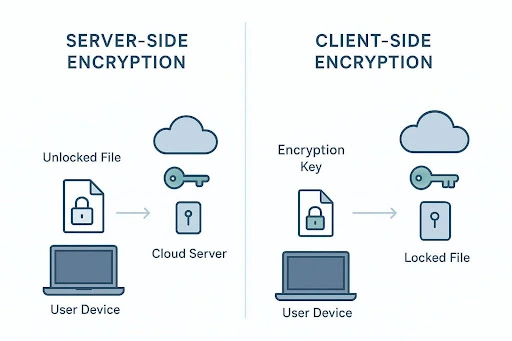
With server-side encryption, your file is sent to the cloud provider, then encrypted on their side and stored. This protects against some external attacks but gives the provider control of the keys. If they receive a government order, or if an insider abuses access, your data could be decrypted.
Client-side encryption, often called end-to-end encryption (E2EE), offers stronger privacy. Here, your data is encrypted on your device with a key that never leaves your control. The provider only ever sees and stores encrypted blobs. That means even employees at the company can’t view your photos or read your documents.
For people putting privacy first, client-side encryption is the only acceptable baseline in 2026.
Zero-Knowledge Encryption Explained
Zero-knowledge encryption is widely seen as the “gold standard.” In this setup, the provider has “zero knowledge” of your stored data and your main password. When you sign up, a Master Key is created, and you are the only one who has it. The provider does not keep a copy on their servers. This is a very strong security benefit but also brings more responsibility for the user.
Because the provider never knows your key, they cannot reset your password or recover your data if you forget it. If you lose your Master Key and don’t have a backup or recovery phrase, your files are gone for good. This gives unmatched privacy-no provider, no hacker, and no government can read your data-but it means you must carefully protect your login and backup methods.
Many users in 2026 rely on hardware security keys or printed recovery codes stored in safe places to handle this risk.
Why Encrypting Cloud Storage Matters for Data Protection in 2026
Digital risks in 2026 are far greater than they were ten years ago. Simple viruses have been replaced by automated, AI-based attackers that scan systems at high speed. Storing unencrypted data today is like leaving your front door open in an area with constant break-ins. Encrypted cloud storage has moved from a nice extra for activists to a basic need for everyday users.
The amount of data we keep online has also grown sharply. Tax records, mortgage files, medical reports, and private family videos all now live in the cloud. When this data leaks, the effects can be severe: identity theft, money loss, and long-term damage to your reputation.
Strong encryption acts as a last barrier that keeps your life private even if the provider’s hardware or network is attacked.

The Evolving Threat Landscape and Cybersecurity Risks
Recent years show many warning examples. The Toyota cloud misconfiguration dated 2023, which exposed information from over 260,000 customers, as well as the Real Estate Wealth Networks leak affecting 1.5 billion files, reveal how vulnerable a cloud configuration must be. They usually started from benign blunders or bad configuration choices and went unnoticed forever. Toyota waited for almost nine years to expose their data set from 2015 to 2023.
In many of these cases, strong encryption could have greatly reduced the damage.
Ransomware in 2026 has further developed. They attack and do not lock files, but threaten to release the data at the same time as stealing it (double extortion). Almost useless to harm the victim if the files have zero-knowledge encryption, because those stolen files will not be readable. By encrypting storage, one of the key tools utilised by modern attackers to threaten victims also goes away.
Privacy, Compliance, and Regulatory Pressures
Governments have reacted to ongoing data leaks with strong laws such as GDPR in Europe and NIS2. These rules demand that organizations put serious security controls in place, with encryption listed as a key measure.
For companies, choosing encrypted cloud storage is partly about safety and partly about staying on the right side of the law. Failing to protect user data can lead to multi-million-dollar fines and a collapse in customer trust.
People are also paying more attention to data sovereignty. Many prefer providers based in regions like Switzerland or the EU, which have strong privacy laws and fewer sweeping surveillance powers.
Providing from these areas helps ensure your security setup takes into account not only legal standards but fundamental privacy values itself.
User Demand for Confidentiality and Control
User attitudes have changed. The old “I have nothing to hide” view has faded, replaced by a desire for “nothing to show unless I choose.” Privacy-minded individuals, small firms, and professionals in fields such as law and healthcare now actively look for services that give them full control. Users want clear power over who can view their data and for how long.
This has pushed providers to innovate. Many now offer private “bundles” that include encrypted chat, secure sharing with expiring links, and quick ways to revoke access. In 2026, users are in charge of their own data, and encryption is the barrier that keeps unwanted eyes out.
Key Features to Look for in Encrypted Cloud Storage Solutions
Cloud services encryptors come in an assortment. When evaluating cloud providers circa 2026, dispense with the tag-cloud and hone in on the underlying technical aspects. A safe service makes use of robust encryption, the clientability of control on options, and an operating policy resisting third-party pushes. This triad combination makes for the safety of your digital assets.
Beyond encryption, think about the overall experience. Does the service sync smoothly across your devices? Is the app simple, or does extra security make everyday work harder? The best tools in 2026 offer “invisible security”-strong protection that works quietly in the background.

Quantum-Resistant Encryption Standards
By 2026, quantum computing will progress from being an abstract theoretical concept to something practical. Classical encryption like AES-256 is still robust against any foreseeable challenges, though quantum computers may someday threaten the current implementations of RSA and ECC. Leading providers are reacting by enabling compatibility with quantum-resistant (post-quantum) algorithms.
These newer methods are built to stay safe even against future quantum-level processing power. When choosing a service, look for one that is already moving to post-quantum standards. This helps keep today’s sensitive data safe for many years, even as hardware gets faster.
Authentication, Access Management, and Secure Sharing
Encryption might not be enough; you need strong access controls to complement it. As of 2026, MFA is a necessity. Say a code from an app, a fingerprint scan, or a hardware key like YubiKey places an extra wall in front of me. If another person seizes my password, they cannot go ahead and access my account without the second factor.
Safe sharing tools also matter. Choose platforms that let you create password-protected links, set end dates, and block downloads on shared files. Some advanced providers offer “account rewind” or similar features so you can roll your account back to a point before malware or accidental deletion.
Data Sovereignty and Hosting Location Considerations
The physical location of your data affects which laws apply to it. Data stored in Switzerland, for example, benefits from some of the strongest privacy rules in the world, separate from EU or US control. Many European providers also follow GDPR strictly, which can keep your data out of reach of broad search laws such as the US Cloud Act.
Many leading providers now let you pick your data center region when you sign up. Choosing where your files live-whether in Luxembourg, Switzerland, the US, or elsewhere-shows that a provider respects user control and understands cross-border legal issues.
Certifications and Independent Security Audits
Security is built on “trust and verify.” Serious providers pay outside firms to audit their systems and seek certifications like ISO 27001, SOC 2, and NIS2-related standards. These show that the company follows strict rules for security processes, staff checks, and infrastructure upkeep.
Transparency speaks of self-regulatory mechanisms. When a provider propagates a full set of client-side code, independent experts like White Hackers can verify that it contains no hidden backdoors or bugs. It is projected to be open source by 2026 and will be seen as the hallmark of a trustworthy website provider because only a very confident designer would share his or her designs for public scrutiny.
Usability, Platform Compatibility, and Support
A security tool is only helpful if people are willing to use it. If an app is slow or the mobile version is awkward, users tend to fall back on less safe options. The top encrypted storage services in 2026 offer well-built apps for Windows, macOS, Linux, iOS, and Android. Features like “virtual drives,” which let you work with cloud files as if they were on your local disk, greatly improve day-to-day use.
Support quality also matters. With zero-knowledge setups, you need clear guides and quick help channels. While support staff cannot recover a lost password, they should still assist with setup, integration, and account questions. Around-the-clock support is becoming normal for higher-tier plans.
Top Cloud Storage Platforms With Built-in Encryption for 2026
The 2026 market offers a wide range of options, each built for different types of users. Whether you are a freelance creative who needs huge space for photos and videos or a lawyer who must follow HIPAA and similar rules, there is a service built for your situation.
Below, we look at the main strengths and weaknesses of the leading encrypted cloud storage providers.
1. Proton
Founded in Geneva, Switzerland, by scientists who met at CERN, Proton has grown from an encrypted email provider into a full privacy ecosystem trusted by over 100 million users. Every service — from Proton Drive to Proton Mail — is built around end-to-end encryption and zero-access architecture, meaning not even Proton can read your data. Being headquartered in Switzerland also means your files benefit from some of the world's strongest privacy laws.
Pros
- End-to-end and zero-access encryption applied across all services by default.
- Broad ecosystem covering cloud storage, email, VPN, password manager, and more under one account.
- Open-source and independently audited, free tier available for all core products.
Cons
- Storage limits on the free plan are modest compared to competitors, requiring an upgrade for meaningful space.
- The wide range of products can feel overwhelming for users who only need a single service.
2. pCloud
Headquartered in Switzerland, pCloud has attracted a large user base thanks to fast transfers and unique lifetime pricing. All files are protected with SSL during transfer, but the main highlight is the “pCloud Crypto” folder, which offers a separate zero-knowledge area for your most private data.
Pros
- Very fast upload and download speeds.
- Lifetime plans can be great long-term value.
- Built-in media player and social media backup tools.
Cons
- Zero-knowledge encryption requires a paid Crypto add-on (about $150 for lifetime).
- Support is mostly handled through email.
3. Sync.com
Based in Canada, Sync.com focuses on “privacy by default.” Every file you upload is protected with end-to-end encryption from the start. It is especially popular with teams thanks to strong admin and sharing controls.
Pros
- Zero-knowledge encryption included on all plans.
- No upload file size limits.
- Strong compliance support (HIPAA, GDPR, PIPEDA).
Cons
- Can be slower than competitors like pCloud because of heavy encryption work.
- No dedicated Linux desktop client.
4. Internxt
Internxt is one of the newer open-source platforms that is fast-growing for the niche it occupies, which happens to be quantum-resistant security. It splits your files into smaller bites and then distributes them across a network, so if a server is breached, their data stays mostly safe from snooping.
Pros
- Open-source code, allowing full public review and audits.
- Mix of zero-knowledge and post-quantum encryption.
- Sleek, modern apps on all major platforms.
Cons
- Missing some advanced features like full file version history and video previews.
- Free tier is small (1 GB).
5. NordLocker
Created by the team behind NordVPN, NordLocker is both storage and a local file vault. You create encrypted “lockers” on your computer, and you can choose which of them to sync to the cloud for remote access.
Pros
- Very simple drag-and-drop interface.
- Based in Panama, with a strong focus on no-logs policies.
- Can encrypt local files even if you do not sync them.
Cons
- No trash folder, so deleted files are permanently removed.
- Mobile apps work more like web wrappers than full native apps.
6. MEGA
MEGA is one of the older names in encrypted storage, known for its large free plan and clean web interface. It offers a range of privacy tools, including encrypted chat and video calls, making it a flexible option for personal use.
Pros
- Very generous free storage (20 GB).
- Includes encrypted messaging and meeting features.
- Global server network for quick access.
Cons
- Past questions around ownership and history, even though technical security is solid.
- High storage tiers can be pricey.
7. Tresorit
Tresorit targets enterprise customers and is often compared to a digital “vault.” It offers very detailed access controls, logs, and policy tools that large companies need to protect sensitive designs and trade secrets.
Pros
- Excellent admin and user management features.
- Data centers in Switzerland and Hungary with strong protections.
- Integrations for Outlook and Gmail for secure attachments.
Cons
- Among the most expensive providers.
- Interface may feel too complex for casual home users.
8. Icedrive
Icedrive has gained attention by using the Twofish algorithm, which many experts view as at least as strong as AES. Its Windows “virtual drive” is often praised as one of the best ways to work with cloud files as if they were stored locally.
Pros
- Excellent virtual drive that behaves like a local hard drive.
- Twofish encryption offers a different security approach than most rivals.
- Attractive prices, including lifetime options.
Cons
- Virtual drive is only available on Windows.
- Fewer collaboration tools than services like Sync.com or Tresorit.
How to Choose the Right Cloud Storage Solution With Built-in Encryption
Picking a provider depends heavily on how you use data. Do you mainly want to store years of family photos, or do you manage sensitive client contracts?
The market is specialized enough that you can find services that fit your needs quite closely instead of relying on one-size-fits-all options. Focus on the features that match your daily tasks.
A good first step is to try the free plans. Most providers offer several gigabytes at no cost so you can test speed, ease of use, and sharing tools.
Don’t focus only on the monthly price. Think about how much peace of mind the service gives you. Paying a bit more for strong protection of your digital life is usually worth it.
Assessing Your Data Security Requirements
Start by listing your most important and sensitive files-the “crown jewels.” If you handle financial records, legal documents, or medical data, zero-knowledge encryption should be non-negotiable.
If your main use is storing photos, videos, and other media for quick streaming, pCloud may be a better fit, even if the Crypto folder costs extra. For businesses, meeting standards like HIPAA or GDPR may outweigh all other features.
Comparing Pricing, Plans, and Storage Options
Pricing models in 2026 differ a lot. Lifetime plans from pCloud, Icedrive, and Internxt can be a bargain for individuals who prefer a one-time payment. Many companies, however, choose flexible monthly or yearly subscriptions so they can scale up or down easily and handle costs as operational expenses.
Always read the details for renewal terms, storage limits, and possible extra charges for things like file versioning.
Platform Integration and Migration Considerations
Think about the tools you already use. If you mainly work on Windows, Icedrive’s virtual drive can be a major advantage. If your team lives in Microsoft 365, you might want a provider like Sync.com that works well with live document editing.
Also check migration options. Some providers offer programs or services that help move large amounts of data from an older, unencrypted service into the new encrypted one.
Long-Term Support and Provider Trustworthiness
Trust is the base of any encrypted storage choice. Look at a provider’s history, public reports, and how they responded to earlier problems. A company that has been around for years, regularly updates its apps, and publishes clear plans for future security improvements is usually safer than a new, unproven startup.
Check for ongoing development and commitments to new methods like quantum-safe encryption.
Actionable Tips for Maximizing Security with Encrypted Cloud Storage
Even the strongest encryption can be weakened by poor user habits. Think of encrypted cloud storage as a strong safe: it doesn’t help if you leave the key lying around.
To protect your data properly in 2026, you need both a secure platform and good personal practices, using all the tools the provider offers.
Security is an ongoing process. By reviewing your settings regularly and staying aware of new attack methods, you keep your risk level low. The steps below are simple but very effective ways to improve your protection.
Enable Two-Factor Authentication
This is the single biggest step you can take. MFA keeps your account safe even if your password is stolen in another breach. For 2026, it is best to use an authenticator app or a hardware key instead of SMS codes, since attackers can still hijack phone numbers using SIM swapping.
Regularly Update Access Permissions
Many people share a folder once and then forget it for years. Make it a habit to review your shared links from time to time and remove access that is no longer needed. Use expiring links whenever possible so access ends automatically. This reduces the number of possible entry points to your data.
Backup Encrypted Data in Multiple Locations
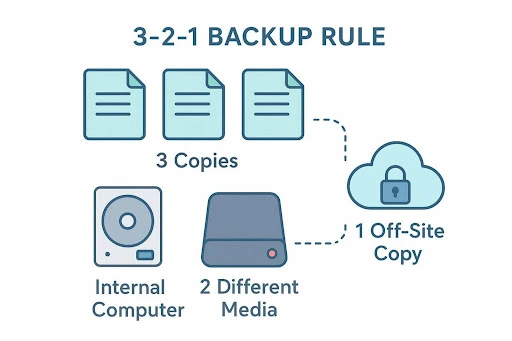
Security experts recommend the “3-2-1” backup rule: keep three copies of your data, on two different types of storage, with one copy stored off-site. Your encrypted cloud account is a strong off-site copy, but it should not be your only one. Keeping an encrypted local backup on an external drive gives you access even if your provider goes down or your internet fails.
Monitor for Suspicious Activity
Most higher-end services offer login history and device activity logs. Check these at least once a month. If you see a sign-in from a device or country you don’t recognize, change your password right away and contact support.
Many platforms also send alerts or push notifications on new logins, giving you an early warning of possible intrusions.
Final Thoughts: Choosing Encrypted Cloud Storage for Strong Data Protection in 2026
The direction of travel is clear: user-controlled security and more distributed storage models are becoming the norm. New systems like IPFS and Storj are rising, spreading data across many locations and working alongside zero-knowledge encryption to reduce single points of failure. In 2026, individuals can have more control over their data than ever-if they choose the right tools.
In the end, the best cloud storage service is the one that fits smoothly into your life while keeping your data safely locked away from prying eyes. Whether you go with pCloud’s Swiss-based service, Sync.com’s strong privacy defaults, or Internxt’s decentralized approach, you are taking a key step toward protecting your digital identity. By choosing built-in encryption now, you protect your files, your privacy, and your sense of security in an increasingly connected age.
FAQs
Technically, encryption and decryption add some extra work, which can slow things down slightly. But with the hardware and software optimizations available in 2026, most users don’t notice a difference in daily use. Well-optimized services like pCloud and Icedrive often match or even beat typical unencrypted storage speeds.
Yes. Modern encrypted services have developed ways to share data without breaking the zero-knowledge model. Commonly, they create a unique, temporary key for each shared file or folder and send it through a protected link. You can still add passwords and expiry dates, keeping full control over who sees what and for how long.
Free plans are great for testing but come with limits. You may get only 1-5 GB of space, lower bandwidth, or miss features like zero-knowledge encryption (as is the case with pCloud’s free tier). Paid plans usually offer much more space (up to 20 TB or more), better performance, priority support, and extra security features such as full end-to-end encryption and account rewind.
No. Major mainstream tools such as Google Drive, Dropbox, and OneDrive usually rely on server-side encryption and keep control of the keys. For true zero-knowledge protection, you need a specialized service like Sync.com, Internxt, or Proton Drive, which are built from the start so that the provider cannot read your files.

Head of SEO Operations
Recent Blogs


Elia Martell
5 Virtual Recruiting Support Operations for Tech and Healthcare Teams
-
09 Oct 2026
-
8 Min
-

462


Jane Hart
Why LinkedIn Campaign Optimization Requires More Than CPC and CTR
-
09 Oct 2026
-
8 Min
-
149

Jane Hart
How to Vet an Offshore SEO Partner: A Due-Diligence Checklist for Agencies and Brands
-
08 Oct 2026
-
8 Min
-
249

Jane Hart
Benchmarking GPU Providers: A Practical Guide to Comparing Cloud Compute Options
-
07 Oct 2026
-
6 Min
-
171
