


Table of Contents
Digital onboarding breaks at scale unless IT gets it right. Learn how teams use cloud platforms, automation, and smart systems to keep hiring smooth.
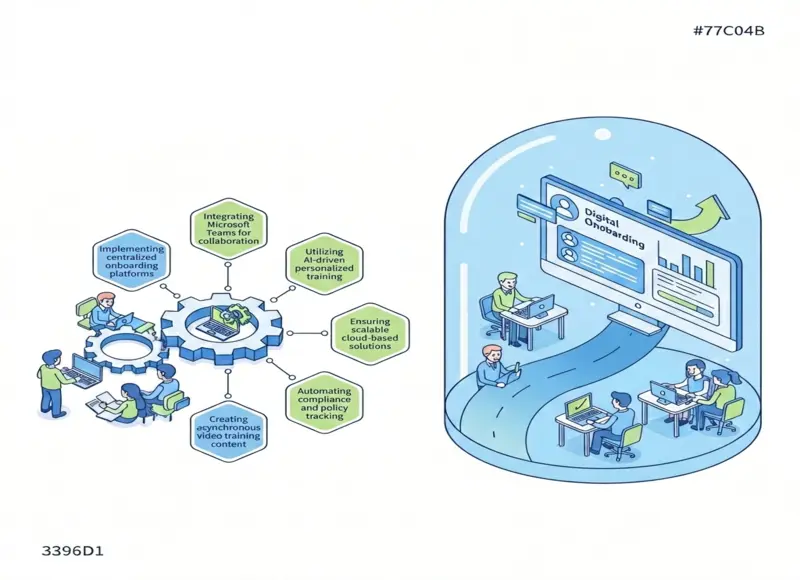
Digital onboarding now shapes how organizations grow and adapt. As teams spread across locations and roles, IT teams guide how new employees connect, learn, and get to work through digital tools and systems.
IT teams support scalable digital onboarding by building reliable, secure systems that deliver consistent training and access as the organization grows. They help align platforms, collaboration tools, and automation so onboarding works for remote, hybrid, and global teams without slowing down or losing control.
1) Implementing centralized onboarding platforms
IT teams drive scalable digital onboarding by setting up centralized platforms. These systems bring tasks, tools, and data into one place. New hires see a clear path from day one, and teams reduce manual work.
Central platforms connect HR systems, IT service desks, and learning tools. Automation assigns accounts, training, and access based on role. This setup supports role-based learning paths and consistent steps across teams.
Identity checks also fit into these workflows. Platforms can include background reviews and KYC verification as part of identity checks. This approach helps teams meet compliance needs while keeping the process efficient.
IT teams manage access controls and data flow across systems. They set standards so each department follows the same process. Central oversight makes updates faster and reduces errors as the company grows.
These platforms also collect feedback and usage data. IT teams use this data to fix gaps and improve tools over time. The result stays consistent even as hiring scales.
2) Integrating Microsoft Teams for collaboration
IT teams often use Microsoft Teams as a central space for digital onboarding. Teams brings chat, meetings, and files into one tool, which helps new hires find what they need without switching apps. This setup supports remote, in-office, and hybrid workers.
IT teams create standard team templates for new employees. These spaces include welcome messages, key documents, and links to tools used on day one. This approach reduces setup time and keeps onboarding consistent across roles.
Teams channels support clear and focused communication. IT teams organize channels by topic, such as training, support, or team updates. New hires can ask questions in shared spaces and learn from past conversations.
Meetings in Teams support live onboarding sessions and recorded training. IT teams schedule early check-ins, short group calls, and optional social meetings. These touchpoints help new employees build connections and understand team norms.
Integrations extend Teams beyond basic communication. IT teams connect task tools, knowledge bases, and approval workflows. This access lets new hires complete common actions without leaving Teams.
3) Utilizing AI-driven personalized training
IT teams use AI-driven tools to tailor training for each new hire. These systems adjust content based on role, skill level, and progress. This approach helps employees focus on what they need first.
AI platforms can recommend lessons, short videos, or practice tasks at the right time. IT teams connect these tools to identity systems and learning platforms. This setup keeps access secure and content relevant.
Automation also speeds up onboarding at scale. AI can handle routine updates, track completion, and flag gaps without manual work. IT teams monitor performance data to improve training paths over time.
Personalized training supports global teams with different needs. AI can adapt language, format, and pace for diverse users. IT teams ensure the platform runs smoothly and integrates with other systems.
This model reduces delays during onboarding. New hires gain skills faster and with less confusion. IT teams play a key role by managing the technology behind these experiences.
4) Ensuring scalable cloud-based solutions
IT teams use cloud platforms to support digital onboarding as demand grows. They choose services that add or remove resources based on real use. This approach helps systems handle spikes during peak sign-ups.
They design systems with shared standards and repeatable setups. Clear workflows for setup, testing, and release reduce errors. Automation handles routine tasks and keeps environments consistent.
They plan capacity early and watch usage closely. Monitoring tools show when systems need more power or can scale down. This practice controls costs while keeping performance steady.
They build for reliability with backup systems and failover options. If one service slows or fails, another takes over. This design keeps onboarding available and reduces downtime.
They also focus on security and access control. Cloud tools help manage user roles and protect data. Strong controls support growth without raising risk.
5) Automating compliance and policy tracking
IT teams automate compliance tasks to support fast and safe onboarding. They use tools that track rules, policies, and access needs from day one. Automation reduces manual work and lowers the risk of missed steps.
Policy tracking systems store current policies in one place. They push updates to new hires and record who reviewed them. This record helps teams show proof during audits without extra effort.
Automated workflows handle repeat tasks like access reviews and approvals. Triggers and rules guide each step and keep actions consistent. Teams avoid delays and reduce errors as onboarding scales.
Dashboards give real-time views of compliance status. IT teams spot gaps early and act before issues grow. Clear data helps managers make quick, informed decisions.
Templates speed up common tasks such as evidence requests and reports. Teams reuse proven patterns instead of starting from scratch. This approach supports growth while keeping controls in place.
6) Creating asynchronous video training content
IT teams help scale onboarding by building short, clear video lessons that new hires can watch anytime. Asynchronous video removes time zone limits and reduces the need for live sessions.
They set standards for video length, format, and storage. These rules keep content easy to update and simple to find inside the learning system.
IT teams also choose tools that support screen recording, captions, and basic editing. Captions improve access and help learners review key steps without replaying the full video.
Security matters in onboarding content. IT teams control access, protect data, and ensure videos follow company policies before release.
They integrate videos into onboarding paths with quizzes, checklists, or links to guides. This structure helps learners move at their own pace while staying on track.
As systems change, IT teams manage updates and retire old videos. This upkeep keeps training accurate and prevents confusion during early learning.
Core Strategies for Scalable Digital Onboarding
IT teams drive scale by using shared systems and flexible platforms. They focus on tools that grow with hiring needs while keeping setup fast and consistent.
Integrating Cloud-Based Solutions
IT teams use cloud tools to standardize onboarding across locations. These tools support single sign-on, account setup, and access rules from one place. Teams avoid manual work and reduce errors.
Cloud systems also support automation. IT teams trigger tasks like device setup, app access, and policy sign-off on day one. This approach saves time and keeps steps consistent.
Key actions IT teams take include:
- Central user directory for all new hires
- Automated workflows tied to job roles
- Secure access controls that follow least-privilege rules
Cloud tools also scale fast. IT teams add users without new servers or long setup times. They monitor usage and fix issues early through shared dashboards.
Ensuring Platform Flexibility
Flexible platforms help IT teams support change without rework. Hiring plans shift, roles change, and teams grow fast. IT teams choose systems that adjust through settings, not custom code.
They rely on tools with open connections. These platforms connect to HR systems, learning tools, and security software. This setup avoids data silos and reduces delays.
Important platform features include:
- Role-based access that updates automatically
- Configurable workflows for different teams
- API support for system connections
IT teams also plan for future tools. Flexible platforms let them add or remove apps without breaking onboarding. This keeps the process stable as the company grows.
Security and Compliance Considerations
IT teams protect company data while onboarding at scale by setting clear access rules and using secure systems. They also reduce manual work by automating checks, logs, and reports that support audits and regulations.
Managing User Data Safely
IT teams control access from day one to limit risk. They assign roles based on job needs and remove access when roles change. This approach reduces shared accounts and weak passwords.
They protect data in transit and at rest with encryption. They also require multi-factor authentication (MFA) for email, chat, and core apps. These steps lower the chance of account misuse.
Key practices include:
- Single sign-on (SSO) to reduce password sprawl
- Role-based access control (RBAC) to limit permissions
- Audit logs to track access and changes
IT teams review access on a schedule. They also set rules for remote workers and vendors. These rules cover device checks, secure networks, and time-bound access.
Automating Compliance Processes
Automation helps IT teams meet rules without slowing onboarding. Systems can create accounts, apply policies, and record actions automatically. This consistency supports standards like SOC 2, ISO 27001, and HIPAA.
Automated workflows reduce errors from manual steps. They also create clear evidence for audits. Logs capture who approved access, when systems granted it, and what changed later.
Common automated controls include:
- Policy templates applied during onboarding
- Approval flows for elevated access
- Scheduled reviews with alerts for gaps
IT teams integrate onboarding tools with identity systems. This setup keeps access aligned with policy as teams grow.


Head Of Digital Marketing
Recent Blogs


Elia Martell
5 Virtual Recruiting Support Operations for Tech and Healthcare Teams
-

09 Oct 2026
-

8 Min
-

477

Jane Hart
Why LinkedIn Campaign Optimization Requires More Than CPC and CTR
-
09 Oct 2026
-
8 Min
-
155

Jane Hart
How to Vet an Offshore SEO Partner: A Due-Diligence Checklist for Agencies and Brands
-
08 Oct 2026
-
8 Min
-
263

Jane Hart
Benchmarking GPU Providers: A Practical Guide to Comparing Cloud Compute Options
-
07 Oct 2026
-
6 Min
-
173
