


Table of Contents
We tested the top SD card data recovery tools on real deleted and formatted cards to see which software actually restores photos, videos, and files reliably.
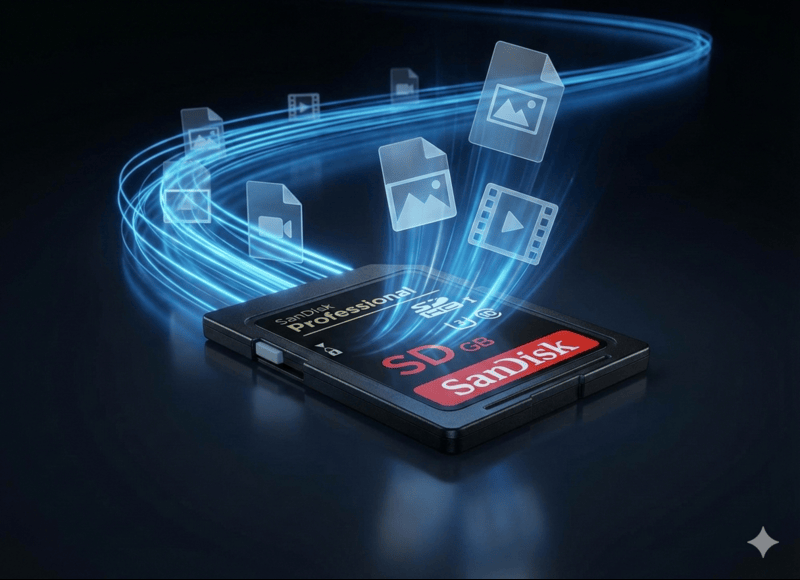
SD cards are still everywhere in 2026 cameras, and if you’re here, you’re probably dealing with deleted files and looking for an easy solution. There are dozens of SD card recovery tools on the market, and on the surface, many of them look similar. To make things clearer, we tested and compared the most reliable options and created this list to help you choose the right SD card data recovery software.
Key Features We Considered
In order to evaluate file recovery software fairly, we used real recovery results. We didn’t blindly trust feature lists or marketing claims. Every tool in the final ranking was tested against the same SD card under identical conditions to make sure the differences in results came from the software itself, not from the test environment.
For our tests, we picked a 16 GB SanDisk SD card. It is a very common consumer-grade card similar to what many cameras and drones use. After we formatted it with FAT32, we filled it with a dataset. It included 100 files: a mix of photos, videos, documents, and audio files to reflect typical real-world usage, not a single file type.
Each recovery tool was first tested on the SD card after simple file deletion, where the file system remained intact. We then repeated the process after a quick format of the same card. This allowed us to see how well each tool handled both basic and more challenging recovery scenarios.
Here is what we considered during evaluation:
- Recovery performance came first. The tool had to reliably restore files from SD cards after deletion and formatting. We paid close attention to how well each program handled photos and videos, especially large files and camera-specific formats.
- Support for camera media was another key factor. Many SD cards come from cameras and recorders, so we checked how well each tool works with common camera file systems and RAW photo or video formats.
- Preview capabilities were also on top of our priorities. You should be able to preview photos and videos before recovery. It helps confirm file integrity and avoid wasting time on unusable files. Tools with stable and accurate previews scored higher.
- Next on the list is ease of use and clarity. A recovery tool should guide users clearly through the process. We looked at how easy it was to start a scan and restore files without advanced technical knowledge.
- We assessed how useful each free or trial version is and how fairly the pricing reflects the tool’s capabilities. Tools that allow meaningful testing before purchase scored higher than those with overly restrictive limits.
- Finally, we also considered extra features, especially those that help when dealing with corrupted or unreadable SD cards. For example, disk imaging or sector-by-sector cloning can make a big difference when you’re trying to figure out how to uncorrupt an SD card or recover files from a failing one.
With this approach, we were able to identify where each tool performs best and which ones offer the most value.
Top 5 Best Recovery Software for SD Card
Not all recovery tools perform the same, so we tested several and kept the five that worked best across common SD card issues.
Here is our list of the best data recovery software:
1. Disk Drill
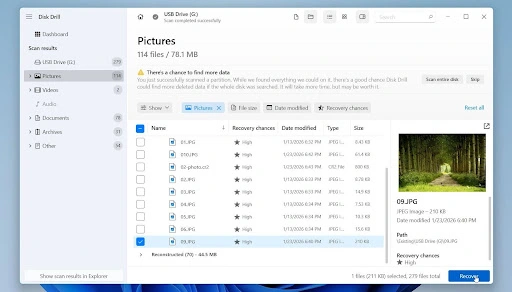
Disk Drill is our top recommendation for SD card recovery in 2026. It combines strong recovery performance with a clean interface. Disk Drill is well-suited for SD cards used in cameras, drones, dash cams, and other recording devices.
In addition to its Universal Scan, it offers Advanced Camera Recovery, which targets fragmented footage from GoPros, drones, digital cameras. In our experience, this module often recovered video files that many other recovery tools failed to detect/restore at all.
What we also appreciate is the fact that a single license works on Windows and macOS. No need to buy the software twice. Aside from file recovery, Disk Drill offers tools to prevent future data loss, like disk backup and health monitoring. These are intended to help avoid additional data loss on SD cards that have errors or exhibit unstable behavior. After successful recovery you can use the SD card repair tool to fix issues you have with your SD card.
Key features
- Universal Scan and Advanced Camera Recovery
- File preview for photos and videos before recovery
- Byte-to-byte disk image creation
- Support for common camera file systems and formats
- Data protection and disk health tools
Pricing
- Free version: Scan, preview, and limited recovery (up to 100 MB on Windows)
- PRO: $89 one-time license
- Enterprise: $499 for business use
In our tests, Disk Drill recovered all deleted files from the SD card and preserved folder structure accurately. After quick formatting and corruption, it restored 95 out 100 files, including large videos and RAW photos. Preview functionality worked reliably, which helped confirm file integrity before recovery. Disk Drill delivered the most consistent results across all scenarios.
2. R-Studio
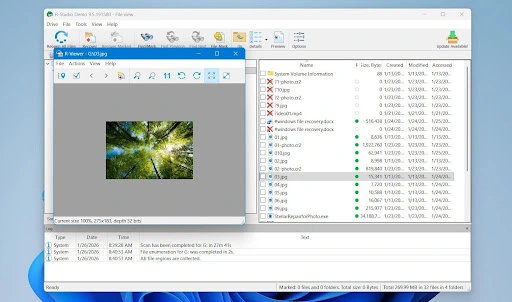
R-Studio is a professional-level recovery tool that provides a detailed control over complex data loss situations. The software supports Windows, macOS, and Linux and offers deep control over scanning and recovery processes. R-Studio is often used when SD cards become RAW, lose partitions, or suffer serious file system damage. The software provides extensive control over how scans are performed and how results are handled, which allows experienced users to adjust the recovery process to match difficult scenarios. This flexibility can be useful when standard, automated recovery tools fail to detect all data.
What is its greatest strength, is also its greatest weakness: the interface is a labyrinth of options which are readily accessible, all at once, from the main interface. It is a more complex environment for the everyday user, since file preview features are a little limited and there are many more options to learn.
Key features
- Advanced file system and RAW recovery support
- Wide OS compatibility, including Linux
- Strong video recovery capabilities
- Hex editor and advanced disk analysis tools
Pricing
- Free version: Scan and preview, very limited recovery (1024 KB max file size)
- Standard license: $63.99
- Technician licenses available for professionals
R-Studio recovered 90 files out of 100 in the first test and performed strongly after formatting, 86 out of 100. Video recovery was particularly solid, though results with some RAW photo formats were less consistent than Disk Drill. The interface requires technical knowledge, but for advanced users dealing with serious corruption, R-Studio remains a very powerful option.
3. DiskGenius
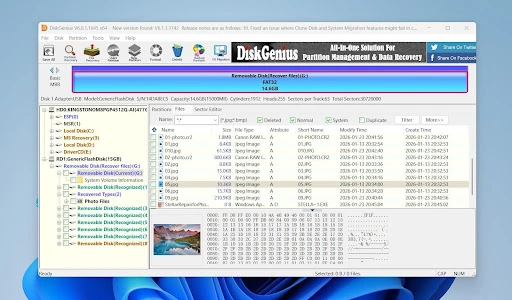
DiskGenius is a Windows-only tool that combines SD card recovery with partition and disk management features. It is mostly used in situations where data loss is linked to formatting mistakes or partition changes. DiskGenius works with all the usual SD card file systems and does a decent job recovering deleted files or quick-formatted cards, as long as there’s still some structure left.
Besides file recovery, it packs in a bunch of partition and disk management tools. That’s handy if you’re dealing with more serious storage issues, not just missing files. Still, when it comes to large videos or camera RAW files, its recovery results often underperform. The interface gets the job done, but it feels a bit clunky compared to more user-friendly options. And honestly, the free version barely lets you recover anything, just tiny files.
Key features
- Deleted file and formatted card recovery
- Partition management and disk cloning tools
- One-time license pricing
- Works well with standard file systems
Pricing
- Free version: Recovery limited to files under 64 KB
- Standard: $69.90 one-time
- Pro: $99.90 one-time
DiskGenius recovered 85 deleted files when the file system was intact. However, after quick formatting and corruption, recovery success dropped noticeably to 70 out of 100, with weaker results for RAW photos and large video files. It is a solid choice for Windows users handling basic SD card issues, but it is not the strongest performer for camera-heavy workflows.
4. PhotoRec
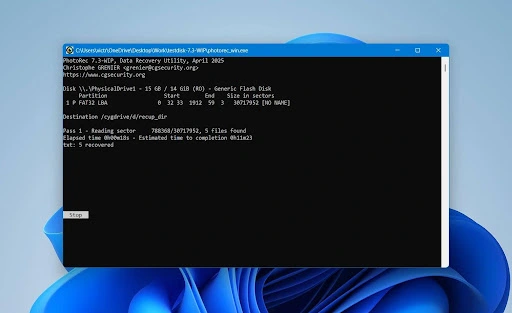
PhotoRec is a free, open-source recovery tool that relies entirely on file signatures rather than file system data. It comes bundled with TestDisk, which can be used for SD card repair. This allows it to recover files even when the SD card is severely corrupted or unreadable. PhotoRec is surprisingly good for what it offers, and is our top suggestion for people who want a completely free SD card data recovery tool.
Let’s talk about a few downsides. First off, PhotoRec mostly runs in the command line, no graphics here. For a lot of people, that’s a real deal-breaker. There’s something called qPhotoRec that gives you a simple graphic interface, but honestly, it just helps you get started and only works on Windows.
One more thing: PhotoRec doesn’t bring back file names or folder structures. If your SD card is new or has just a few files, that’s not too painful. But if you use your card all the time, get ready to dig through a mess of unnamed files after recovery. It’s not exactly convenient.
Key features
- Signature-based recovery
- Works without a readable file system
- Completely free and open-source
- Cross-platform support
Pricing
- Free (no paid versions)
In our tests, PhotoRec recovered 84 out of 100 files after deletion and 79 in the corruption scenario. It handled common photo and video formats well, but did not restore file names or folder structure, as we mentioned. The lack of preview and the basic interface limit usability, but for a free tool that works on heavily damaged cards, PhotoRec remains a reliable option.
5. DMDE
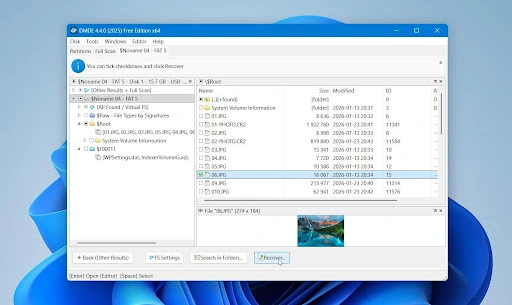
DMDE includes a lot of powerful recovery tools into an affordable package. But the user interface throws a ton of technical options at you, like picking partitions by hand or digging into file system details. If you’re new to this, it can feel overwhelming fast. That extra control really helps if you’re dealing with tricky recovery jobs, but it also makes the software harder to learn than simpler, more user-friendly options.
But if you know what you’re doing, DMDE can be a good option. It lets you view detected file systems and recovered files directly, choose which data to extract, and recover files even when the file system is damaged or partially missing. In difficult cases, this makes it possible to recover data that simpler, fully automated tools may skip or misinterpret
Key features
- Advanced partition and file system analysis
- Manual recovery options
- Cross-platform support
- Generous free version for testing
Pricing
- Free version: Limited recovery per session
- Express: ~$20/year
- Standard / Pro: Higher-tier licenses available
DMDE recovered all deleted files in the first test, but reached about 60% recovery on the corrupted SD card. Results were mixed for large and fragmented media files. DMDE isn’t the easiest tool for beginners, but if you know your way around data recovery, it’s a solid pick. You get a lot of control and features without expensive pro licenses
Which SD Card Recovery Software Should You Choose?
Not sure which SD card recovery software to go with? Check out the table below. It lays out the key features, supported platforms, pricing, and how each tool did in our hands-on tests:
|
Tool |
Supported Platforms |
Free / Trial Version |
Pricing Model |
Recovery Strength |
Best Suited For |
|
Disk Drill |
Windows, macOS |
Yes, limited recovery (100 MB) |
One-time license, from $89 |
Excellent at both deleted and corrupted data |
All-around SD card recovery |
|
R-Studio |
Windows, macOS, Linux |
Yes, limited recovery (1024 KB) |
One-time license, starts from $63.99 |
Very strong, especially with corrupted/RAW cards |
Advanced recovery |
|
DiskGenius |
Windows |
Yes, files < 64 KB |
One-time license, from $69.90 |
Good for simple deletion, weaker on RAW/large files |
Partition & basic SD recovery |
|
PhotoRec |
Windows, macOS, Linux |
Fully free, no limits |
Free (open source) |
Moderate: signature-based recovery, no filenames |
Severe corruption, no-cost recovery |
|
DMDE |
Windows, macOS, Linux |
Yes, up to 4,000 files per session |
Plans start from $20 per year |
Good for deleted/multiple files, weaker on fragmented media |
Technical users needing control |
Conclusion
No single SD card recovery tool fits every situation. Some options provide an easy, reliable all-around solution for both Mac and Windows users, while others are better suited for complex corruption, simple deletion or formatting cases, or users who need advanced manual control.
There are also capable free tools that can recover data from severely damaged cards, though they may not restore original filenames or folder structure. The right choice depends on your situation, technical comfort level, and whether you value simplicity, advanced features, or cost.
FAQs
Free SD card recovery software is usually safe when you stick with well-known names. PhotoRec, for example, is open source, and people have trusted it for years. The important thing is to make sure you always install it from the official website. Problems show up when you download from random sites or sketchy portals. Those can sneak in adware or malware along with the tool. So, just pay attention to where you’re downloading, and you’ll be fine.
When an SD card comes from a camera or drone, Disk Drill is usually the easiest tool to start with. The software works with camera file systems and includes a mode for interrupted or deleted recordings. This makes it a good choice for files that disappear on cameras or drones.
Yes, recovery software can restore RAW photos from SD cards, as long as the data has not been overwritten. Most support common RAW formats such as CR2, NEF, ARW, and others used by digital cameras. In simple cases, where photos were deleted, but the card was not reused, recovery often keeps the files intact. We suggest stopping all use of the SD card as soon as files are lost. This greatly improves the chances of recovering RAW images without damage.
Recovery software usually gets the job done, even when your SD card looks totally corrupted or can’t be read at all. When that happens, these tools stop relying on the file system and start scanning for file signatures instead. Apps like Disk Drill, R-Studio, PhotoRec, and DMDE can pull files off a card even if the file system’s gone. But there’s a catch: if the card’s actually damaged on a physical level, that’s a whole different story.
If the SD card has failing memory cells or connection issues, we recommend creating a disk image before you start the scan. Physically damaged cards require professional recovery services and cannot be handled by software al


Head Of Digital Marketing
Recent Blogs


Elia Martell
5 Virtual Recruiting Support Operations for Tech and Healthcare Teams
-

09 Oct 2026
-

8 Min
-

477

Jane Hart
Why LinkedIn Campaign Optimization Requires More Than CPC and CTR
-
09 Oct 2026
-
8 Min
-
155

Jane Hart
How to Vet an Offshore SEO Partner: A Due-Diligence Checklist for Agencies and Brands
-
08 Oct 2026
-
8 Min
-
263

Jane Hart
Benchmarking GPU Providers: A Practical Guide to Comparing Cloud Compute Options
-
07 Oct 2026
-
6 Min
-
173
